Lesson 7 — Camera Modes Explained
Lesson 7: Camera Modes Explained — Auto, Program, Aperture Priority, Shutter Priority, and Manual
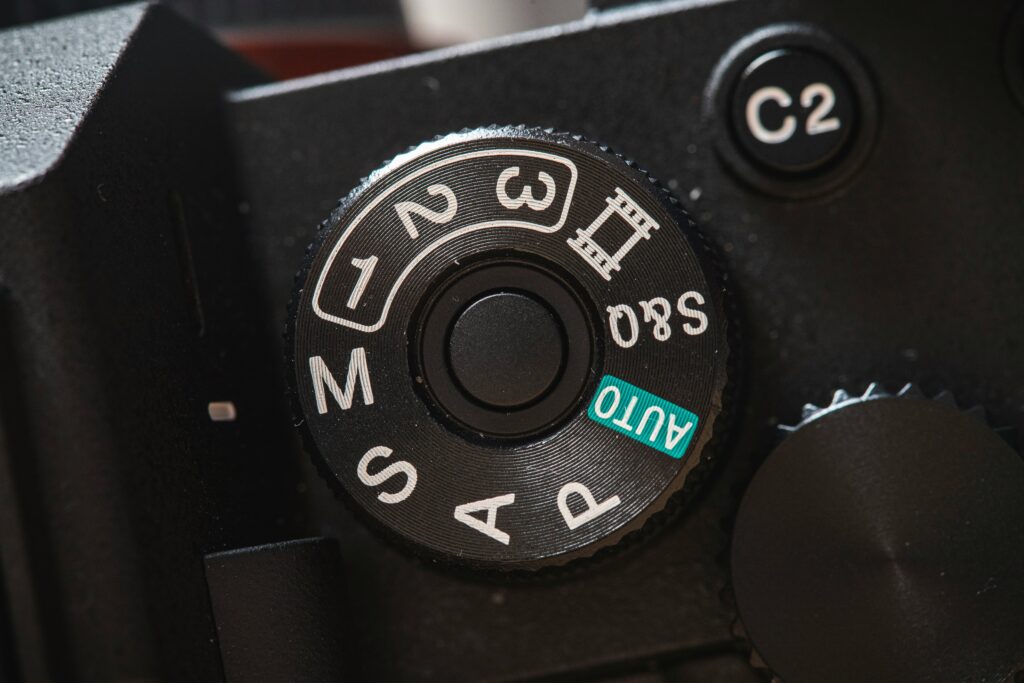
Lessons 3 through 6 covered the exposure triangle piece by piece: aperture, shutter speed, and ISO. Now it’s time to bring them together. Every camera mode explained in this lesson — Program, Aperture Priority, Shutter Priority, and Manual — is really just a different way of dividing control over those same three settings between you and the camera. Once you understand what each mode actually hands you control over, choosing between them stops being guesswork.
Auto Mode: The Camera Decides Everything
In fully Automatic mode, the camera sets aperture, shutter speed, and ISO on its own, based on its built-in metering. It’s the mode most cameras default to out of the box, and it’s genuinely useful when you need a shot quickly and have no time to think through settings. The trade-off is control: you have no say over depth of field or how motion is rendered, which means the camera might choose a wide aperture when you wanted everything in focus, or a slow shutter speed when you needed to freeze motion.
Program Mode (P): A Small Step Toward Control
Program mode still lets the camera choose both aperture and shutter speed for a balanced exposure, but it gives you one advantage Auto doesn’t: the ability to shift between equivalent combinations. Nikon’s own documentation describes this as “flexible program” — rotating a command dial lets you select a different aperture/shutter speed pairing that produces the identical exposure, so you can nudge toward a faster shutter speed or a narrower aperture without leaving the semi-automatic comfort of Program mode. It’s a good stepping stone for snapshots and situations where you don’t want to miss a shot fumbling with settings.
Aperture Priority (A or Av): You Control Depth of Field
In Aperture Priority, you choose the aperture, and the camera automatically selects a shutter speed to produce a correct exposure. This is the mode most beginners reach for first, because it hands you direct control over depth of field — the setting from Lesson 4 that shapes whether your background blurs or stays sharp — while the camera handles the math of getting the exposure right. Digital Camera World’s guide to the PASM modes notes that Aperture Priority is particularly well suited to situations where controlling what is and isn’t in focus matters more than controlling motion.
There’s one real risk worth knowing: in low light, the camera may be forced to select a shutter speed slow enough to introduce camera shake or motion blur, since it’s prioritizing your chosen aperture over everything else. Setting a minimum shutter speed through Auto ISO, where available, guards against this.
Shutter Priority (S or Tv): You Control Motion
Shutter Priority works the same way in reverse — you choose the shutter speed, and the camera selects the aperture needed for a correct exposure. This is the mode to reach for when motion is the deciding factor in a shot: sports, wildlife, water, anything where freezing or intentionally blurring movement matters more than depth of field. Photography Life’s explanation of the PSAM modes points out the trade-off directly: because you’re no longer controlling aperture, you lose direct say over depth of field, and in low light the camera may be forced toward its widest available aperture, which can lead to underexposure if there still isn’t enough light to reach your chosen shutter speed.
Manual Mode (M): You Control Everything
In Manual mode, you set aperture and shutter speed yourself (with ISO set manually or via Auto ISO), and nothing is left to the camera’s judgment. This is the slowest mode to shoot in — every setting has to be chosen deliberately — but it’s also the only mode that gives you complete, predictable control over all three points of the exposure triangle simultaneously. Manual mode is the natural next step once Aperture Priority and Shutter Priority feel intuitive, particularly in situations like studio work or landscapes on a tripod, where light isn’t changing quickly and there’s time to dial everything in precisely.
Which Mode Should You Actually Use?
There’s no universally “correct” mode — the right choice depends entirely on the shot in front of you:
- Portraits and landscapes, where depth of field matters most: Aperture Priority
- Sports, wildlife, and anything fast-moving: Shutter Priority
- Quick snapshots where you don’t want to think about settings: Program
- Studio work, tripod landscapes, or full creative control: Manual
Many experienced photographers move fluidly between Aperture Priority and Manual depending on the shoot, rather than treating one mode as inherently more “professional” than another — the goal is matching the mode to what the shot actually needs.
Why Understanding Camera Modes Matters
Now that Lessons 3 through 6 have covered what aperture, shutter speed, and ISO each do individually, camera modes are simply the interface for controlling them. Aperture Priority hands you the exposure triangle’s most creative lever (depth of field) while automating the rest; Shutter Priority does the same for motion; Manual hands you the whole triangle at once. None of these modes require memorizing anything new — they’re just different ways of applying everything from the last four lessons.
What You Now Know About Camera Modes
Auto and Program let the camera make most or all of the exposure decisions for you. Aperture Priority gives you direct control over depth of field while the camera handles shutter speed. Shutter Priority gives you direct control over motion while the camera handles aperture. Manual gives you complete control over both, at the cost of speed. Choosing between them isn’t about which is “better” — it’s about which setting matters most for the specific shot you’re taking.
Next: Lesson 8 — Autofocus Explained: AF Modes, Focus Points, and When to Use Manual Focus
➤ Browse Used Nikon Cameras — Good Used Cameras
Sources
Nikon — P, S, A, and M Modes — Nikon D3500 Digitutor
Digital Camera World — What Are the Differences Between the PASM Exposure Modes?
Photography Life — Understanding Digital Camera Modes (PSAM and More)
✅ Fact-checked against Nikon, Digital Camera World, and Photography Life. All technical claims — Program flexible-shift behaviour, Aperture Priority and Shutter Priority mechanics, Manual mode control, and mode-selection guidance — confirmed accurate as of July 2026.